As of 2016-02-26, there will be no more posts for this blog. s/blog/pba/
Showing posts with label template. Show all posts

Last month, I figured out how to query with namespace using xmllint, but there is a more easier way using different program, xmlstarlet.

For exact same results using xmlstarlet:


xmlstarlet sel -N a="http://purl.org/rss/1.0/" -t -m '//a:item[1]/a:description' -v 'text()' test.xml

Using xmllint, tricky and ugly…:


echo -e 'setns a=http://purl.org/rss/1.0/\ncat //a:item[1]/a:description/text()' | xmllint --shell test.xml

The template -t option in xmlstarlet can be very helpful if you don’t want to use XSLT for some simple output. You can compose the template entirely in command-line fashion.

A few days ago, I read Bash Script Templates and I think this might be a good idea to start one of my own. I later found two more posts about it, it's not easy to find one. Either search engine was playing with me or I was too dumb to enter perfect search terms.

I read them and got some concepts from all three of them. Some I like, some I don't. I mingled them altogether with my own thoughts. I created a new repository: template.sh, it could be a good idea for it to have own repo, so you may contribute to it easily.

It's still a work-in-progress, but it already has 177 lines (159 sloc) for first version. I have been thinking that a library could be a better idea, especially when I was writing the parse_options function. It could be working like argument parsing in C or in Python with their libraries, and the code would be more clean.

I had also thought of creating user interface, you can click buttons or be asked questions to enable/disable features, then a template will be generated. But that's a lot of works, not sure if that's worth. I didn't go that way eventually, but a simple file.

Please be aware that I haven't used it yet, so I don't really know if it's practical enough. If you run into trouble, please open an issue. Any feedback is welcome, leave a comment.

Google Webmaster Tools told me:

Performance overview

On average, pages in your site take 6.4 seconds to load (updated on Oct 31, 2010). This is slower than 83% of sites. These estimates are of low accuracy (fewer than 100 data points). The chart below shows how your site’s average page load time has changed over the last few months. For your reference, it also shows the 20th percentile value across all sites, separating slow and fast load times.

https://blogger.googleusercontent.com/img/b/R29vZ2xl/AVvXsEgge7Qg9_maCsMOFuNeGlgHsZTED0xTedUWC4GjbgpImAB-z9BatXwLfvEz9zE0uwPPE0ZqPbKKTdfxJBRyJesKax7XsjNekAuk0N6EIdGd99sn38YuAU1JUiIeZ0kiUcACQA1EP3ft2hg/s800/chart.png

6.4 seconds?! Are you kidding me? Well, it’s not. My posts pages really take about that long to load. You might want to ask me, what’s the problem with 6.4 seconds? It’s not really long comparing to other blogs. It’s not, but if you look at my page, you don’t see any crap banners, icons, images. My blog is basically pure text only, except the images in post contents and two Google AdSense ad units. So, it’s too long to me.

I am pretty sure where I can cut the number down: Disqus!

https://farm5.staticflickr.com/4104/5212507835_8448c57ce2_o.png

If you scroll down, you will see Disqus is no longer loaded by default. You will need to click on that button to load comments. I also make related posts list loaded by user request, that helps a little, and I moved jQuery code into yjlv.js, request_count--. I know this is cheating in order to get low loading time.

Here is a diff for my template changes:


--- template.xml.orig 2010-11-28 08:11:25.000000000 +0800
+++ template.xml 2010-11-28 07:58:55.000000000 +0800
@@ -3,7 +3,7 @@
<html xmlns='http://www.w3.org/1999/xhtml' xmlns:b='http://www.google.com/2005/gml/b' xmlns:data='http://www.google.com/2005/gml/data' xmlns:expr='http://www.google.com/2005/gml/expr'>
<head>
<b:if cond='data:blog.pageType == &quot;item&quot;'>
- <title><data:blog.pageName/> &lt;&lt;&lt; $(<data:blog.title/>)</title>
+ <title><data:blog.pageName/></title>
<b:else/>
<b:if cond='data:blog.pageType == &quot;static_page&quot;'>
<title><data:blog.pageName/> &lt;&lt;&lt; $(<data:blog.title/> --page)</title>
@@ -26,8 +26,8 @@
<data:blog.feedLinks/>
<b:skin><![CDATA[]]></b:skin>
<link href='http://www.yjl.im/css/yjlv.css?4' rel='stylesheet'/>
M#- <script src='http://ajax.googleapis.com/ajax/libs/jquery/1/jquery.min.js'/>
<!--[if lt IE 9]><script src="http://html5shiv.googlecode.com/svn/trunk/html5.js"></script><![endif]-->
+ <script src="http://www.yjl.im/js/yjlv.js?8"></script>
</head>
<body>
<header id='blog-header'>
@@ -253,7 +253,12 @@
</div>
<footer>
<b:if cond='data:blog.pageType == &quot;item&quot;'>
- <div style='float:right;width:312px'> Possibly (Definitely Not) Related Posts: <div id='gas-results'/> </div>
+ <div style='float:right;width:312px'>
+ <div>Possibly (Definitely Not) Related Posts:</div>
+ <div id='gas-results'>
+ <input type="button" value="Click to load related posts list" onclick='$.getScript("http://brps.appspot.com/gas.js")'/>
+ </div>
+ </div>
</b:if>
<div class='post-footer-line post-footer-line-1'>
<span class='post-author vcard'>
@@ -312,11 +317,19 @@
</footer>
<b:if cond='data:blog.pageType == &quot;item&quot;'>
<section id='post-comments'>
- <h2>Comments</h2>
+ <h2><a expr:href='data:post.url + &quot;#disqus_thread&quot;'>Comments</a></h2>
<div id='disqus_thread'/>
- <script type='text/javascript'> if (document.location.href.indexOf(&#39;/b/post-preview&#39;) == -1) $.getScript(&#39;http://yjlv.disqus.com/embed.js&#39;);</script>
- <noscript>Please enable JavaScript to view the <a href='http://disqus.com/?ref_noscript=yjlv'>comments powered by Disqus.</a></noscript>
- <a class='dsq-brlink' href='http://disqus.com'>blog comments powered by <span class='logo-disqus'>Disqus</span></a>
+ <script>
+ $(function(){
+ // If visitors are led to comments, then load comments automatically.
+ var href = document.location.href;
+ if (href.indexOf('#disqus_thread') >= 0 || href.indexOf('#comment-') >=0) {
+ $.getScript("http://yjlv.disqus.com/embed.js");
+ $('#comments-loader-button').remove();
+ }
+ });
+ </script>
+ <input type="button" id="comments-loader-button" style="width:620px;margin:10px;" value="Click to load comments or to write a comment" onclick='$.getScript("http://yjlv.disqus.com/embed.js");$(this).remove();'/>
</section>
</b:if>
</article>
@@ -639,4 +652,4 @@
</div>
</footer>
</body>
-</html>
\ No newline at end of file
+</html>

I added a small piece of code which will automatically load comments when visitors come via a link like .../post-title.html#disqus_thread or .../post-title.html#comment-1234567. Visitors will have no problems to read the comment.

Also, I made a change to posts’ page titles. I removed <<< $(YJL --verbose) from title because I saw this in my Stats page:

http://farm6.static.flickr.com/5201/5212521441_ae24c47be9.jpg

The last keyword "yjl table" made me do so. That visitor must found nothing what he or she was looking for. "yjl" matched on page title, search engines are just not smart as you and me. If I was that visitor, I would not even click on the result since it’s clear that matched part is useless.

We will see if next check (after 2010-11-27T08:47:50-07:00) will resullt a significant drop on loading time, I believe it will.

Note

If you visit this post for “Bad value X-UA-Compatible for attribute http-equiv on element meta” error message from W3C Validator, you might want to read this post, instead. (2011-02-01T04:59:53Z)

Blogger Buzz just announced a new variant of Simple template, Super Simple, which is made by Josh Peterson and that is what this blogging is using. Generally I am happy with Simple, though I made quite some modifications on my own and its element structure always a headache to me if I don’t use Firebug or Chrome’s inspector to help me figure out. I feel <div> in Simple template could be thousands of Mille-feuille being stacked up, or something like buy one, get twenty free. The styles, hell, period.

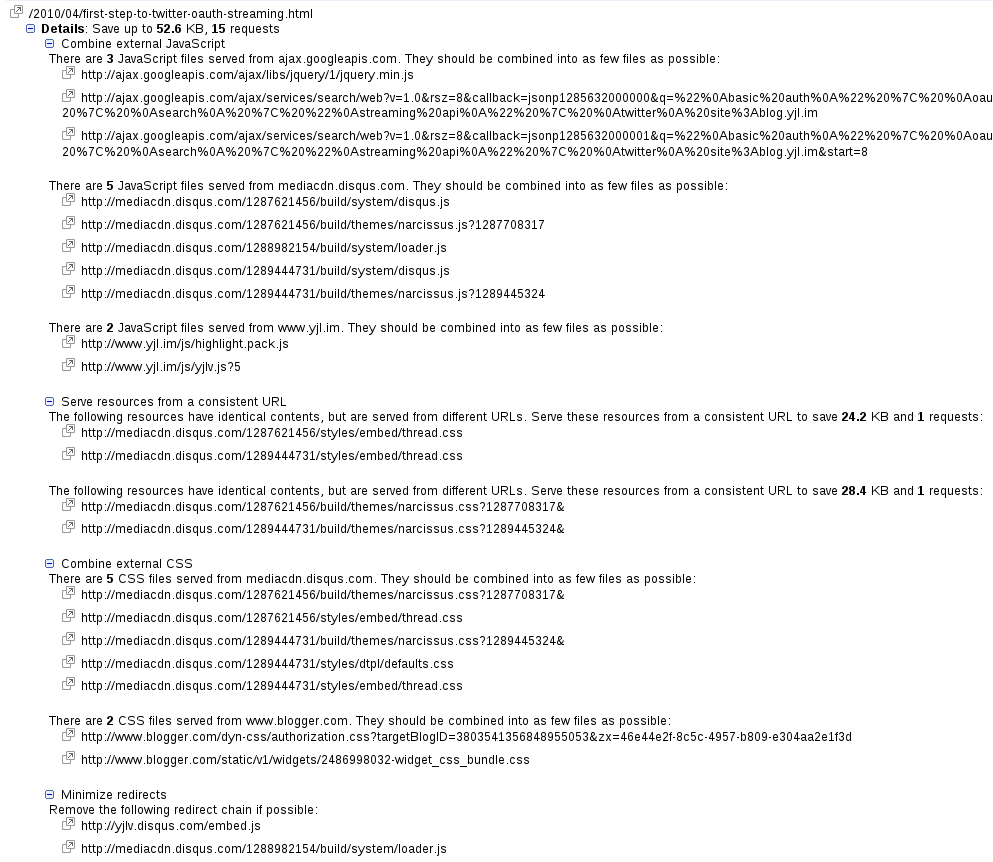
I have been trying to clean up in order to get good score in Page Speed or ShowSlow. Combination and compression of CSS and JavaScript of my own are all I could do, I managed to rise the score from around 78 to 84. The Blogger’s ..widget_css_2_bundle.css is a mess, it has a lot of unused and inefficient styles which I can not touch. Also, Disqus is another score lower, it loads many JavaScript and CSS. But Disqus is a must-have to me, I am not going to use Blogger’s commenting system.

Put them all together: I decided to make own on my own.

The question is should I choose HTML5? I have always want to make a blog which is HTML5 valid. (I really don’t care if visitor’s browser can support HTML5 or not) Being valid is always very hard for Blogger’s templates, I haven’t seen any. Maybe classic template would be able to achieve the goal, but I wasn’t sure. Now, take a look at the errors (from W3C validator):


Line 2, column 41: Attribute b:version is not serializable as XML 1.0.

<html b:version='2' class='v2' dir='ltr'>

Line 2, column 41: Attribute b:version not allowed on element html at this point.

<html b:version='2' class='v2' dir='ltr'>

Line 4, column 60: Bad value X-UA-Compatible for attribute http-equiv on element meta.

<meta content='IE=EmulateIE7' http-equiv='X-UA-Compatible'/>

Line 23, column 128: & did not start a character reference. (& probably should have been escaped as &amp;.)

…n.css?targetBlogID=8246144319788321828&zx=c0ac3a3d-1faa-44ba-8aaf-6ff4fdba4b17…

Line 455, column 500: Bad value 30px for attribute height on element iframe: Expected a digit but saw p instead.

…frame" allowtransparency="true" title="Blogger Navigation and Search"></iframe>

Line 455, column 500: Bad value 100% for attribute width on element iframe: Expected a digit but saw % instead.

…frame" allowtransparency="true" title="Blogger Navigation and Search"></iframe>

Line 455, column 500: The marginwidth attribute on the iframe element is obsolete. Use CSS instead.

…frame" allowtransparency="true" title="Blogger Navigation and Search"></iframe>

Line 455, column 500: The marginheight attribute on the iframe element is obsolete. Use CSS instead.

…frame" allowtransparency="true" title="Blogger Navigation and Search"></iframe>

Line 455, column 500: The scrolling attribute on the iframe element is obsolete. Use CSS instead.

…frame" allowtransparency="true" title="Blogger Navigation and Search"></iframe>

Line 455, column 500: The frameborder attribute on the iframe element is obsolete. Use CSS instead.

…frame" allowtransparency="true" title="Blogger Navigation and Search"></iframe>

Line 455, column 500: The allowtransparency attribute on the iframe element is obsolete. Use CSS instead.

…frame" allowtransparency="true" title="Blogger Navigation and Search"></iframe>

Line 644, column 84: The border attribute on the table element is obsolete. Use CSS instead.

…e border='0' cellpadding='0' cellspacing='0' class='section-columns columns-2'>

Line 644, column 84: The cellpadding attribute on the table element is obsolete. Use CSS instead.

…e border='0' cellpadding='0' cellspacing='0' class='section-columns columns-2'>

Line 644, column 84: The cellspacing attribute on the table element is obsolete. Use CSS instead.

…e border='0' cellpadding='0' cellspacing='0' class='section-columns columns-2'>

Line 682, column 84: The border attribute on the table element is obsolete. Use CSS instead.

…e border='0' cellpadding='0' cellspacing='0' class='section-columns columns-2'>

Line 682, column 84: The cellpadding attribute on the table element is obsolete. Use CSS instead.

…e border='0' cellpadding='0' cellspacing='0' class='section-columns columns-2'>

Line 682, column 84: The cellspacing attribute on the table element is obsolete. Use CSS instead.

…e border='0' cellpadding='0' cellspacing='0' class='section-columns columns-2'>

Line 702, column 87: & did not start a character reference. (& probably should have been escaped as &amp;.)

…m/rearrange?blogID=8246144319788321828&widgetType=Attribution&widgetId=Attribu…

Line 702, column 110: & did not start a character reference. (& probably should have been escaped as &amp;.)

…144319788321828&widgetType=Attribution&widgetId=Attribution1&action=editWidget…

Line 702, column 132: & did not start a character reference. (& probably should have been escaped as &amp;.)

…Type=Attribution&widgetId=Attribution1&action=editWidget' onclick='return _Wid…

The errors above is Super Simple template on blog without any posts or any removable widgets. I think it’s pretty possible to be valid, well, at least, only few errors. I recalled when I moved on to Blogger, I gave up when I wanted to try to clean up the errors, some are fixed in generation of HTML, I had no way to clean up.

Why I want to make one instead of modifying Super Simple? The reasons are

  1. It’s not true HTML5 even it’s valid — it doesn’t have HTML5 spirit, for example, it’s still using h1 > h2 > h3 for blog title, date, and post title. In HTML5, there are semantic elements such as <header>, <article>, I want to use them.
  2. It’s not clear for the permission of modification. Of course, Blogger encourage you to modify Super Simple, but do you have to attribute the original template author? Definitely in my opinion. But I don’t think you should put that in footer. Since Blogger added Template Designer, the attribution is fixed at footer. You can remove it in template manually, but again, it’s not the right thing to do.

I personally dislike such kind of linkback, therefore I am going to create one on my own, a HTML5 template.

I was thinking to use classic one when I read this, now I think I should stay with XML template because:

  • I can still play with new toys that Blogger have.
  • I don’t know if I can have Popular Posts in classic template or other gadgets.

So, you might see some glitches in the following time.

1   Updated on 2010-09-18

I am just starting my template and I am 100% sure that no way I can make a HTML5 template valid. Here is a very simple template:


<!DOCTYPE html>
<html>
<head>
<title><data:blog.pageTitle/></title>
<b:skin/>
</head>
<body>
</body>
</html>

It generates:


<!DOCTYPE html>
<html>
<head>
<title>Oops! Broken!</title>
<link type='text/css' rel='stylesheet' href='http://www.blogger.com/static/v1/widgets/3761248391-widget_css_bundle.css' />
<link rel="stylesheet" type="text/css" href="http://www.blogger.com/dyn-css/authorization.css?targetBlogID=8246144319788321828&zx=9739f52a-690f-49ac-b9ee-e63848f84276"/>
<style type="text/css">#navbar-iframe { display:block }
</style>

<style id='page-skin-1' type='text/css'><!--

--></style>
<script type="text/javascript">
if (window.jstiming) window.jstiming.load.tick('headEnd');
</script></head>
<body>
<div class='navbar section' id='navbar'></div>

<script type="text/javascript">
if (window.jstiming) window.jstiming.load.tick('widgetJsBefore');
</script><script type="text/javascript" src="http://www.blogger.com/static/v1/widgets/3254348898-widgets.js"></script>
<script type='text/javascript'>
[snip]
</script>
</body>
</html>

The problem is on second stylesheet’s link, validator told me the only one error:


<pre>Error Line 6, Column 128: & did not start a character reference. (& probably should have been escaped as &amp;amp;.)

…n.css?targetBlogID=8246144319788321828<span style="color:red;font-weight:bold">&</span>zx=9739f52a-690f-49ac-b9ee-e63848f84276…</pre>

Now, I recall this is the error I saw when I want to clean it up at first time. There is no way you can fix it, only Blogger team can.

2   Updated on 2010-09-28

I have asked about the validation ten day ago, but you know it’s Google. Add your comments to that post, hope that will get their attentions.

I want a section which lays three widgets horizontally, Recent Posts, Recent Comments, and Top Posts. If I have them at my sidebar, then the whole page length would be going to long when reading a single post. If I can line them up since they have close widget height, the result should look good. Note that I plan to place this new section just above the original footer section.


Only need to add two parts. One is the CSS, the other is the XML.


Here is the CSS part:

#above-footer-wrapper {
  width:840px;
  clear:both;
}
#above-footer-left {
  width:270px;
  float:left;
  margin-right:15px;
}
#above-footer-middle {
  width:270px;
  float:left;
  margin-right:15px;
}
#above-footer-right {
  width:270px;
  float:left;
}


My page width is 840 pixels, you need to change it to fit yours. I evenly distribute the space to three columns which is 840 = 270 * 3 + 15 * 2. The spacing between columns is 15 pixels.


For XML part, you need to find footer

<div id='footer-wrapper'>


Add new section to be:

    <div id='above-footer-wrapper'>
      <b:section class='footer' id='above-footer-left'>
      </b:section>
      <b:section class='footer' id='above-footer-middle'>
      </b:section>
      <b:section class='footer' id='above-footer-right'>
      </b:section>
    </div>

    <div id='footer-wrapper'>
      <b:section class='footer' id='footer'>
      </b:section>
    </div>


Once you done, save the template and switch to Page Element tab, that should look like:


Here is a screenshot about how it looks like:


Note that the color borders are for easy understanding only.


You can scroll down to see this 3-column section in practical  use.

I wrote a simple Python script which utilizes gdata-python-client to download the layout templates of your Blogger blogs. You can read and download from BackupTemplate.py.

It is easy to use, just make sure you have gdata-python-client on you computer. You will be prompted for your email and password. Here is a screenshot how it is working:


Layout templates of all blogs will be saved in current directory with filename like
blogId-blogName-YYMMDD-HHMMSS.xml
You can also add a file called BackupTemplate.yaml:
email: [email]
password: [password]
So you won't be asked for account every time.