As of 2016-02-26, there will be no more posts for this blog. s/blog/pba/
Showing posts with label tmux. Show all posts

First of all this isn’t meant to be accurate or very reliable, even flawed, I just want to see some numbers, because in pymux‘s README, it mentions about the performance, but not actual numbers:

Tmux is written in C, which is obviously faster than Python. This is noticeable when applications generate a lot of output. Where tmux is able to give fast real-time output for, for instance find / or yes, pymux will process the output slightly slower, and in this case render the output only a few times per second to the terminal. Usually, this should not be an issue. If it is, Pypy should provide a significant speedup.

1   Method

I use my own test script, termfps.sh, which is written in Bash. I thought about using find or yes as mentioned in the README, but I am too lazy to write a script for the tests, I used what I already have in hand.

Since pymux is written in Python, so I tested with two implementations, the official CPython and PyPy (RPython to C). They will all run within the environment virtualenv creates, and using pip to install pymux 0.5 and Pyte 0.4.10, and along with their dependencies.

The test script is run with reset && ./termfps.sh in urxvtc with font xft:Envy Code R:style=Regular:size=20:antialias in dwm with virtually full-screen of 1680x1050, dwm topbar is hidden, and the window size is 1669x1027 and geometry is 111x33.

Both tmux and pymux are run without configuration files.

2   Used versions

nameversionnote
urxvt9.21x11-terms/rxvt-unicode-9.21
termfps.sh2014-09-06git-00559f9
tmux1.8app-misc/tmux-1.8
Python2.7.10dev-lang/python-2.7.10-r1
Python3.4.3dev-lang/python-3.4
PyPy4.0.1dev-python/pypy-bin-4.0.1
PyPy322.4.0dev-python/pypy3-bin-2.4.0-r1
virtualenv12.0.5dev-python/virtualenv-12.0.5
Pymux0.5 
six1.10.0 
prompt-toolkit0.57 
Pyte10.4.10 
docopt0.6.2 
Pygments2.0.2from prompt-toolkit
wcwidth0.1.6from prompt-toolkit
[1]The latest Pyte 0.5.x (2016-01-11) doesn’t work with pymux 0.5.
[2]PyPy3, there is a bug and can’t be worked with virtualenv, the latest 2.4.0 (2014-10-09) doesn’t include the fix (2015-02-06). The test is run without virtualenv created environment.

3   Result

From the fastest to slowest by the elapsed time:

test withversionlines3elapsedfpscps
urxvtc49.2133000.497200.879735,822
tmux1.832001.786055.962198,779
Python2.7.10531028.237003.541012,185
PyPy4.0.131057.751001.731005,958
PyPy2.4.031070.458001.419004,883
Python3.4.3631128.130000.780002,685
[3]Because of titlebar and/or status bar, there will be different in lines.
[4]urxvt is run without anything but the script, this is just for reference.
[5]Python 2.7.10 isn’t working properly. From my eyes, I can not see some frames, it goes like 1, 4, 8, 2, 5, and so on. Some frames doesn’t not seem displayed.
[6]All Python versions but PyPy3 are run within virtualenv created environments.

4   Conclusion

Although there is terminal lines differences up to 2 lines, but since results vary significantly, I ignored the lines without normalizing those numbers.

By numbers, Python 2 seems to win, but as the note above, it’s flawed. Some frames I didn’t see. However, that doesn’t mean those frames are dropped by pymux. They could somehow be buffered and flushed out with other frames, or some other explanations.

The only comparison can be done is between tmux and pymux (Python 3/PyPy/PyPy3). By the elapsed times:

  • Pymux (Python 3) is 81.85% slower than pymux (PyPy3) and 7,074% slower than tmux.
  • Pymux (PyPy3) is 3,845% slower than tmux and 22% slower slower than pymux (PyPy).

Of course, it’s a bit of extreme since the test script prints out the entire frame of characters at once, if I recall correctly. In real world case, most of program doesn’t do full terminal size updates. Such as find and yes are outputting line by line, and they won’t be full width every line.

The numbers, either 7,074% and 3,845%, are looking horrible, but the actual user experience with daily programs might not reflect those numbers.
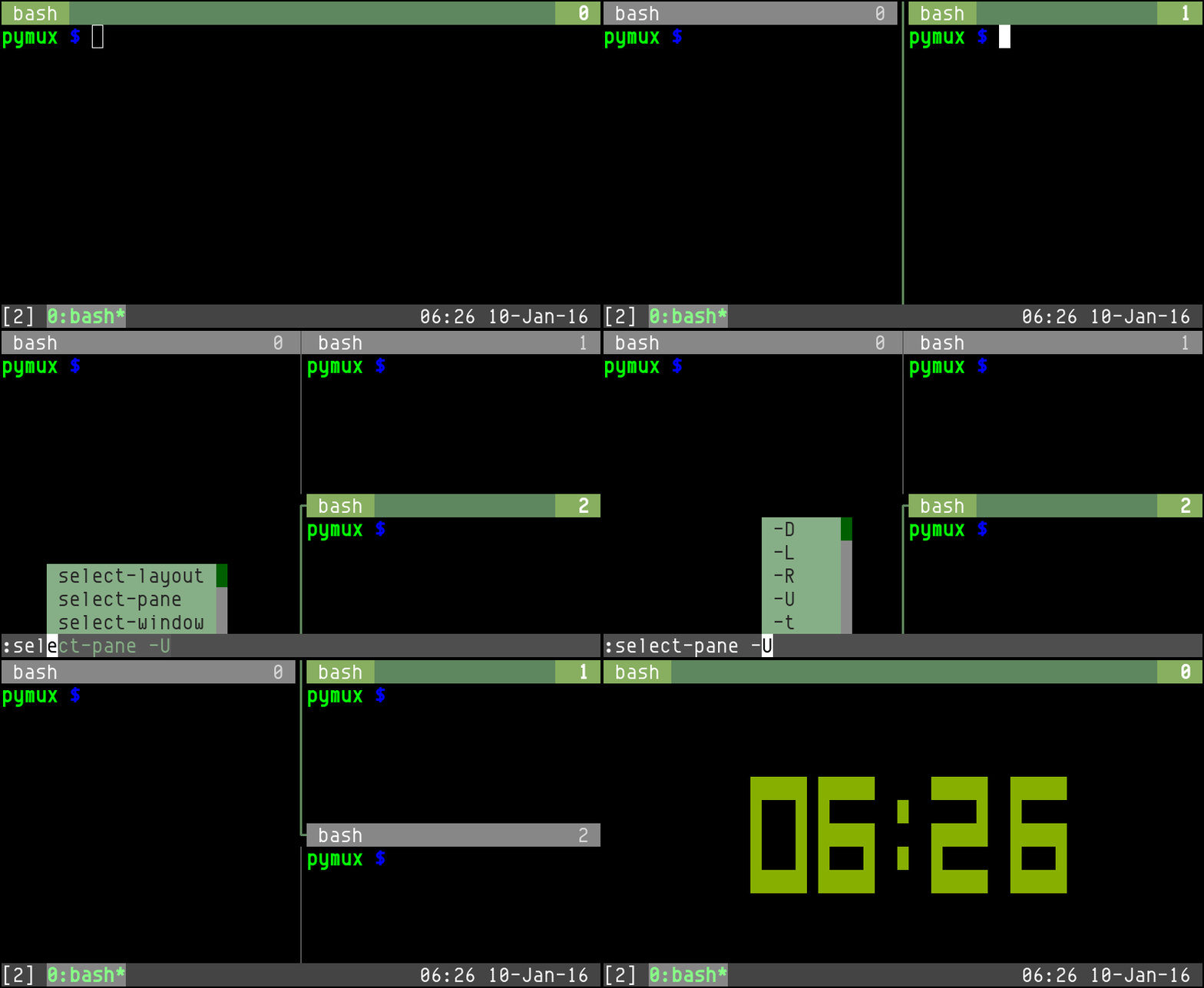
Pymux is a terminal multiplexer and a clone of tmux, but with some improvements, such as autocompletion menu as you can see below.

https://blogger.googleusercontent.com/img/b/R29vZ2xl/AVvXsEiFEHu_xWMUFF80U6B3g6QNxHhX2_iATFsUeFKyxhQAoUOeSgrlw9pEirycwQmmsY8iSEXrCvxppxAyBY8PeOsk_w1eElgbdtJm_1FsC3H_nqqee-oZdKTokVJ4uwRwleSwqRg10_z1gdI/s800-Ic42/pymux.gif

Panes have titlebar, which shows process command name, window title, also information from like using copy-mode. Using fish-style command-line suggestions, it also has 24-bit color support.

Pymux was created by Jonathan Slenders in 2014, written in Python 2/3 with Pyte, docopt, prompt_toolkit, and wcwidth under the New BSD License (3-clause), currently git-9877c9e (2016-01-09, v0.5 (2016-01-05)), works on Mac OS X and Linux.

I never thought I would see italics text in terminal, but I did. I didn't realize what change made this happening when I suddenly saw searching highlights in less had been rendered in italics text. Later, I found out it's the tmux update 1.4->1.5.

A second later, I knew I hate that. It's so hard to see the highlights, I can only be sure there is one hit at the first line of current view. If there is more in the same view, I wouldn't be able to see it. Regular text and italic text look so alike in terminal at first 1000 glances.

Anyway, I found a backward solution, I chose "screen-noit."

I still don't know whose fault is, but clearly it's not as if tmux broke something. In fact, it fixed something what we used to think that's right. However, after all, that really felt suck, and I didn't read anything about it from tmux's changelog 1.4->1.5.

Using colorIT resource


Updated on 2011-07-22

I decided to drop screen-noit and got back to normal screen terminfo with resource setting:

Rxvt*colorIT: #ff0000


I think it's better and prettier, though you might not agree with my color choice. (I ain't no artist!) Anyway, it's now rendered in italic and bloody red style. I can't be missing any highlighted text.

emerge just updated tmux to 1.3 for me. After I restarted tmux (actually, a crash helped me to restart my system, what a coincide), few warning about down-pane and up-pane command is not recognized. That is actually warned by emerge already:

>>> Messages generated by process 9991 on 2010-09-07 20:52:34 CST for package app-misc/tmux-1.3:

WARN: setup

Commands 'up-pane', 'down-pane' and 'select-prompt' were removed in version 1.3.
You may want to update your configuration file accordingly to avoid errors on
tmux startup.

For the full 1.3 Changelog, together with details on what replaced the above
commands, visit http://tmux.cvs.sourceforge.net/viewvc/tmux/tmux/CHANGES.

WARNING: after updating to tmux 1.3 you will _not_ be able to connect to any
running 1.2 tmux server instances. You'll have to use an existing client to
end your old sessions or kill the old server instances. Otherwise you'll have
to temporarily downgrade to tmux 1.2 to access them.

As I said, my system crash, so I didn't get that message at first. I read the man page and that changelog and resolved the issue by myself.

The screen is actually cleaner:


The current pane indication is used to have white line on green. Now it's a simple and clean green line.

There is also a change, it now seems to shows current pane's window (not the window in tmux) name in statusline if window name gets updated.

I did update for sudo originally for the security issue about privilege escalation.

There is a big issue since I started to use Vim, using Vim with terminal multiplexer such as GNU/Screen or tmux, there is always some issue comes from nowhere and you wouldn’t have if you just use Vim in xterm or urxvt.

I had been navigating in my files with a silly way: Press Left/Right key to go up/down in a line. There is a faster way: Press Shift+Left/Right to move backward/forward a word. But it never worked when I was in Screen or tmux.

I googled it and got the solutions, and knew the exactly the problem is. If you look at the key control codes (returned by cat -v), you will see the problem.

$TERM Left S-Left C-Left
xterm ^[[D ^[[1;2D ^[[1;5D
rxvt-unicode ^[[D ^[[d ^[Od
screen ^[[D ^[OD ^[OD

For xterm and urxvt, they both have correct reaction in Vim; for Screen and tmux (tmux uses screen as $TERM), they haven’t and they are worse because there is no distinguish between Shift+Left and Ctrl+Left, but for former problem it’s fixable.

There are a few ways to fix it, I decided to remap the keys. And I have these in my .vimrc:

map ^[OC <Right>
map ^[OD <Left>
map ^[[C <S-Right>
map ^[[D <S-Left>

You can not just copy them to your .vimrc, you have to input ^[OC by pressing in insert mode: Ctrl+V, .