As of 2016-02-26, there will be no more posts for this blog. s/blog/pba/

Dear blog,

I’ve just realized that you and me have never had a talk before, this is our first. Sadly, this wouldn’t go well.

Everything has its time, sooner or later, it will come to an end. Unfortunately, It’s the time for you.

Blogger might not be the perfect platform for people like me and blogs like you, but it’s stable and you only get hiccups from me. Sorry about those.

I’d spent a lot of time to design you and to write on your, 102 commits in private repository for the template and 260 commits for posts. I can’t say you look pretty in other’s eyes, but surely you are in mine.

You were born on 2010-04-16, 5 years and 316 days ago. This is post number 1,794 and the very last number.

So long, it’s been nice with you.

yjl

Note

This is a note currently nothing about about the programming, but the use of C project.

1   $HOME/.local installation with Autotools

Normally, project with GNU Autotools, you can build and install to specified location, for example

% ./configure --prefix=$HOME/.local
% make
% make install

Which installs the files to $HOME/.local other than commonly default /usr/local. On most distributions, you shouldn’t have issues with /usr/local installation, not just the executables, but also the libraries, pkg-config, linking, they all should be configured system-wide.

However, it’s not the case for user home installation, you will need to take some steps to ensure things can be found.

1.1   pkg-config

export LD_LIBRARY_PATH=$HOME/.local/lib
export PKG_CONFIG_PATH=$HOME/.local/lib/pkgconfig:/usr/lib64/pkgconfig

LD_LIBRARY_PATH makes sure any shared libraries are linked during the compilation can be found when you execute the program.

PKG_CONFIG_PATH isn’t for additional paths, so you still need to provide the system pkg-config locations.

1.2   configure

When startup, continues sources prefix/share/config.site, if found, prefix is either default or one you specify with --prefix. In my case, it is $HOME/.local/share/config.site and I have the following content:

CPPFLAGS=-I$HOME/.local/include
LDFLAGS=-L$HOME/.local/lib

They will make sure the header files can be found and linker knows there the shared libraries are stored.

Note

Because I wrote a super long description for this video, I had to split this part out and put it on my blog, or YouTube would tell me my description is too long, which I totally agreed.


1   Making the video

Normally, this is the last one, but for the video, I bumped it up to first.

  1. My record scripts

    • setup-record.sh

      Setting up terminal window for 1280x720 recording region, and adjust my primarily tmux window, so they won’t overlay one on another, but this one for Raincat doesn’t need a terminal window.

    • record.sh

      It records the video. I will choose the FPS, sometimes I need to change the size.

    • re-encode.sh and merge.sh

      record.sh records raw images if not with audio, so the raw video needs to be re-encoded before uploading to YouTube. If I record multiple parts, I need to merge them into one.

    • grabbing a screenshot for video thumbnail, typically the title screen if any.

  2. Writing the description

    • titling the video
    • collecting information about the project, the version, programming language and major dependencies, author, license, etc
    • checking out links, RTFM again, etc.
    • putting all stuff together and write
  3. Making a thumbnail

    If the screenshot already has the title in it, then just use it; if not, put a text overlay on it.

  4. Uploading the video

    • tagging the video
    • adding to appropriate playlists
    • turning on monetization, set up record date
    • re-reading my description
    • double checking everything
    • pushing the publish button
    • checking YouTube video manager, just to be sure

2   Choosing one to make

There are good and suitable projects, but sometimes I don’t have one in my queue list. It normally would be one I like and it has good and necessary stuff to show on video.

3   Searching for new projects

I mostly search in GitHub:

  1. gh-trend.py: it searches GitHub trending projects within the programming languages that I am interested in.
  2. search results with my user script and user style for GitHub. I search for specific keywords every day, with help from my user script and style, I can quickly go through without clicking on things I won’t be interested or already checked.

I also search with Google Image.

I was doing my thing when Not Ready To Make Nice (2006) came up, which won 3 categories of 49th Grammy Awards in 2007, Record of the Year, Song of the Year, and Best Country Performance by a Duo or Group with Vocal.

Last time I listened to this song was years ago and I really had forgot about it. Now listening to it without checking out the MV, I still remembered some smearing actions.

https://i.ytimg.com/vi/pojL_35QlSI/maxresdefault.jpg

Now, as I reading the background of this song and watching the MV again, the symbolic smearing, monochromatic characters, dramatic scenes, and very dark theme, I saw something completely different, but that’s not really what made me to write this SotD.

The lyrics was what touched me after things happened last week, not mad as hell as last week, but nothing left for me to figure out, it’s too late and I just can’t get over with. They say time heals everything, but I’ve given up long time ago.

This is notes for me to remember how to use GHC and Cabal to install and remove stuff I install.

1   Rant, first

I know nothing about Haskell, but so far, after going through pages, I think it’s safe to say there is no such thing in Haskell world as package management, at least for GHC (Glasgow Haskell Compiler). You can install package using Cabal, but uninstall is a pain-in-the-ass, I thought Perl is annoying.

You can --unregister a package with ghc-pkg — library package, not one installs executable — but none of the actual library files are removed, you have to manually remove them or find some scripts to help you. And there is no --uninstall in Cabal, even it does install package for you.

Both ghc-pkg and Cabal are simply not package managers.

So, if your system package manager has Haskell packages, use it to install and uninstall system-wide. If you insist to install at user home or other places, then use Cabal sandbox. Or you can just remove the ~/.ghc and ~/.cabal once they have got too many junks, and start over.

2   Cabal sandbox

2.1   Installing


% SANDBOX=/path/to/somewhere
% export PATH="$SANDBOX/.cabal-sandbox/bin:$PATH"
% mkdir -p "$SANDBOX"
% cd "$SANDBOX"
% cabal sandbox init
% cabal install <package|path>
% <command>

I would suggestion just cd /tmp and use there as sandbox location. It will work well with uninstalling, that is to sandbox delete on /tmp. And if you use tmpfs on /tmp, you don’t even need to bother cleaning up..

2.2   Uninstalling


% rm -rf "$SANDBOX"
# cd "$SANDBOX" && cabal sandbox delete # $SANDBOX still exists

Today, I was digging in GitHub search results, and I noticed that “aedit” and “zedit” showed up side-by-side, what a coincident and a great chance to make a list of A-to-Z editors in regular expression of /[a-z]edit/.

1   Matrix

A           G            
                      Z

2   List

name year language license author extra
aedit

2016

C GPL Alberto Garcia Serrano  
gedit

1999

C GPLv2 gedit team  
Zedit

1988

C GPLv2 Sean MacLennan  

This is a note page for Git usage that I most likely can’t remember how to issue the commands for the tasks.

1   Manipulating commit history

1.1   Inserting a commit

This shows how to insert one in the past:


% git checkout -b new-commit after-this-commit-in-master-branch
% # doing stuff for the new commit
% git commit
% git rebase new-commit master

1.2   hg revert


% git reset --hard

In January, 2013, I started to record the lines of my ToDo files which are taken in vim-notes. One year later, I used Python and matplotlib to draw a graph.

Now, they are 3 years old and they look like:

https://blogger.googleusercontent.com/img/b/R29vZ2xl/AVvXsEjoKMs9ryjN2fY7gtVXpdZlA8LVYVGkrz4hxtQdSrblNSugleVoqDZa9cIgrR1vvOu3VIVX2AL2YsdSLTIpnbybwV-5q6B8Tn9e6IvGuQiSqNLI-UQa-mxOoTfaMbW36683LWEaBlHjAeU/s800-Ic42/ToDoLines.png

Plotted using gnuplot

It’s quite interesting to take a look at it and I can see some moments from this figure. Here is some remarks:

  1. For both in the first year, there were much more changes than the last two. The reason for that is I constantly :w the notes when every I made a changes to them.
  2. As the end of the first year, you can spot a fairly long flat line in ToDo Bin, that’s when I only moved stuff from ToDo to ToDo Bin once a month, and you can clearly see the trend last for a year until the end of second year.
  3. During the first half of second year, I still constantly saved the ToDo, but since the September of the year, I reduced the saves. Normally, only when I had to leave X Window or reboot, then I would save.
  4. The last year, there is a significant drops in Bin, twice, one at the end of second year, another at around middle of February. They were clean-ups, big ones, as you could see the lines of ToDo Bin almost reached 4,000 lines in the end of second year. I had to do something, or the Bin would be like a dump, although it was meant for that.

There is one more thing I wanted to note, though unrelated to the lines, that is gnuplot is much easier to plot this type of graph, and the quality is great almost just out-of-the-box. I actually had updated the Python script for this and generated one before I got a chance to installed gnuplot of making a video, and I tried it out on the lines.

This morning, I noticed the system temperature was oddly low, only just above 40°C. I didn’t mind at first, but then I felt it seemed to run slower than before, which might just from confusion after I checked the frequencies from /proc/cpuinfo.

I had not looked at file for years, and I saw the frequency was fixed at 1833MHz and 1000MHz, two cores, respectively. So, I tried the ultimate fix, turning it off and on again, didn’t work. I began to wonder if anything got updated recently, not the kernel nor any system/hardware stuff that I could remember.

At this point, I laughed before I knew there must be a setting wrong and for years, I had not realized that. So I went back to the power management in kernel configuration and found that I might have been using the wrong governor since 2012-08-27 as kernel 3.4 recommended ondemand governor according to ArchWiki.

That was 3.5 years ago.

Or it could be since 2011-05-18 with kernel 2.6.37, at the time, the userspace governor became the default over performance governor, and SpeedStep configurations were gone.

Nearly 5 years ago.

I knew the setting was correct at very beginning, had seen the frequencies bouncing in Conky, but since I started using my own dzen-status (2010-12-08), CPU frequency was never displayed. I rely on CPU utilization and the temperature to gauge, how hard CPU was working. I never thought about the frequency.

After it’s fixed, I could feel a boost in performance, fully 100% as needed, not only (1000+1833)/(2*1833)=77.28%. Also, the frequency is ranging from 1000 to 1833 MHz, not fixed, anymore.

CPU0 was working super hard at full speed while CPU1 was licensed to slack.

I heard that peas in basket would droop over nicely. Can’t really do that with drainage since the place I have in mind basically still indoor, or I can hang one right above another container, not sure that would work well. A tin can might do, or a milk jug, if that’s the hanging option, then I probably would add beans. Mint and basil might also good options. It’d be next to the window, where unfiltered sunlight still can directly come in.

What else:

  • My right ear and nose were burning, because I took 50 seeds from that long red pepper to save, they hurt. Glad that I hadn’t touched my eyes, unfortunately, I had to go to the toilet.
  • Google Consumer Surveys finally got started. It’s odd, 1 analyzed, but there are 9 in detailed reports.
  • READYT1k is basically done, might need to clean up that ugly codes. Frame rendering took 5+ minutes (200+70MB)and video took 11 minutes, so it would be 15+ minute for 1080p60 (~35MB).
  • Sound system burped for no reason, had to reboot.
  • Refilled bird feeder, back to serve nuts.

Carrot, never got to plant it from store bought, but that could be I was doing it wrong. Although the carrot top that I’ve been caring everyday still going lush green, but I am afraid once I plant it in soil, it soon would rot just like many that I had tried before.

It finally came to me that the reason they all rot is because they were cutting, if I plant they whole, their natural skin is still intact. So, I planted two small carrots, not baby one, just about twice or thrice of my thumb. Not sure if they would have enough energy stored in their root, maybe that doesn’t matter much once they can still get from soil. I will see.

Nibbling small carrots, I only did that last year. To me, carrot was always a vegetable that had to be cooked, but not anymore. The taste and sweetness are incredible, and the crunchiness makes eating one more interesting. The thin root in the end and little top can also be eaten without no effort at all.

Another comment on my Tk/Ttk progress bar example and I finally have enough of it, a big white-on-red text should be another to tell them, well, that’s I’d hope. But, we ended up exchanging more than 10 comments, not bad conversations.

What else?

  • Drying a 15cm long red pepper, it’s nearly uniformly round lengthwise about 2cm in diameter. Not sure if it’s Romero pepper or Serrano pepper, but this one really has smooth skin.
  • While I was eating a wax apple (Syzygium samarangense, also known as was jambu), I saw a big seed inside, that I have never seen before, usually they would be tiny dark bits, but this seed seems mature. I am going to plant it.
  • Finally, Google Consumer Surveys’ Website Satisfaction is showing responses, but only one analyzed and still 0 for normal one.
  • My #1000 READYT project is about half done, need to finish the opening and ending and to work with audio.
  • Bird feeder definitely is working because there was nothing left in the bottle this afternoon.

hexedit is your typical standard hexadecimal editor that you would ever need.

https://blogger.googleusercontent.com/img/b/R29vZ2xl/AVvXsEjHTQXf8DTIhXrzDcmgG55yTYkrRGyQosijO1XV9qeuReRZiomPBfHf-zydHMWqFvmM3ZHyA-LzTkivbbGE-b56bxd2vcz1uDWbd2z_cNHPA5HGvCPCTNxAbyhBVVsWMIKAIXjlLsoPEq8/s800-Ic42/2016-02-02--13%25253A04%25253A37.png

hexedit 1.2.12 (2005-09), with --color

Click to watch some usages

It doesn’t have any fancy UI, but it gets the job done. You can copy, paste, edit, truncate, search, etc.

I have been using it for six years, the same code is more than a decade code. Even the latest code is available for almost three years, I just don’t feel the need of updating it.

hexedit was created by Pascal Rigaux on 1998-07-21, written in C under GPLv2, latest version is 1.2.13 (2013-03-01).

This morning, I spot three nuts were scattered outside off the feeder and that could only mean some birds were at the feeder, and hopefully, they did get a good feast. Nothing in customer feedback box, but I did hear some noise from birds in the last few days, and I’ve seen a bird standing next to the bottle twice, although I’ve not seen any heads in the feeder.

One pepper plant has a flower bud, it’s not going to even flower, I could just pinch it, but I left it alone. Two other pepper plants look bushy, but they are probably just 10cm tall. I am thinking about topping tomato plants, don’t know if that would work the same as pepper plants since tomato already loves to send out suckers.

Tomato is perennial in native habitat, which would be like in Central and South America, and they are here. Two plants survive and still flowering and fruiting. I better not top them since I only know two are indeterminate, the rest of seedlings, not sure what they are, besides they are still too small to have anything to be cut.

What else:

  • The dill was wilting, that probably wouldn’t work.
  • Laptop fan is getting oddly loud with same setting, could be RIP soon.
  • Raining all day, and foggy window, this Saturday could be below 10°C again.

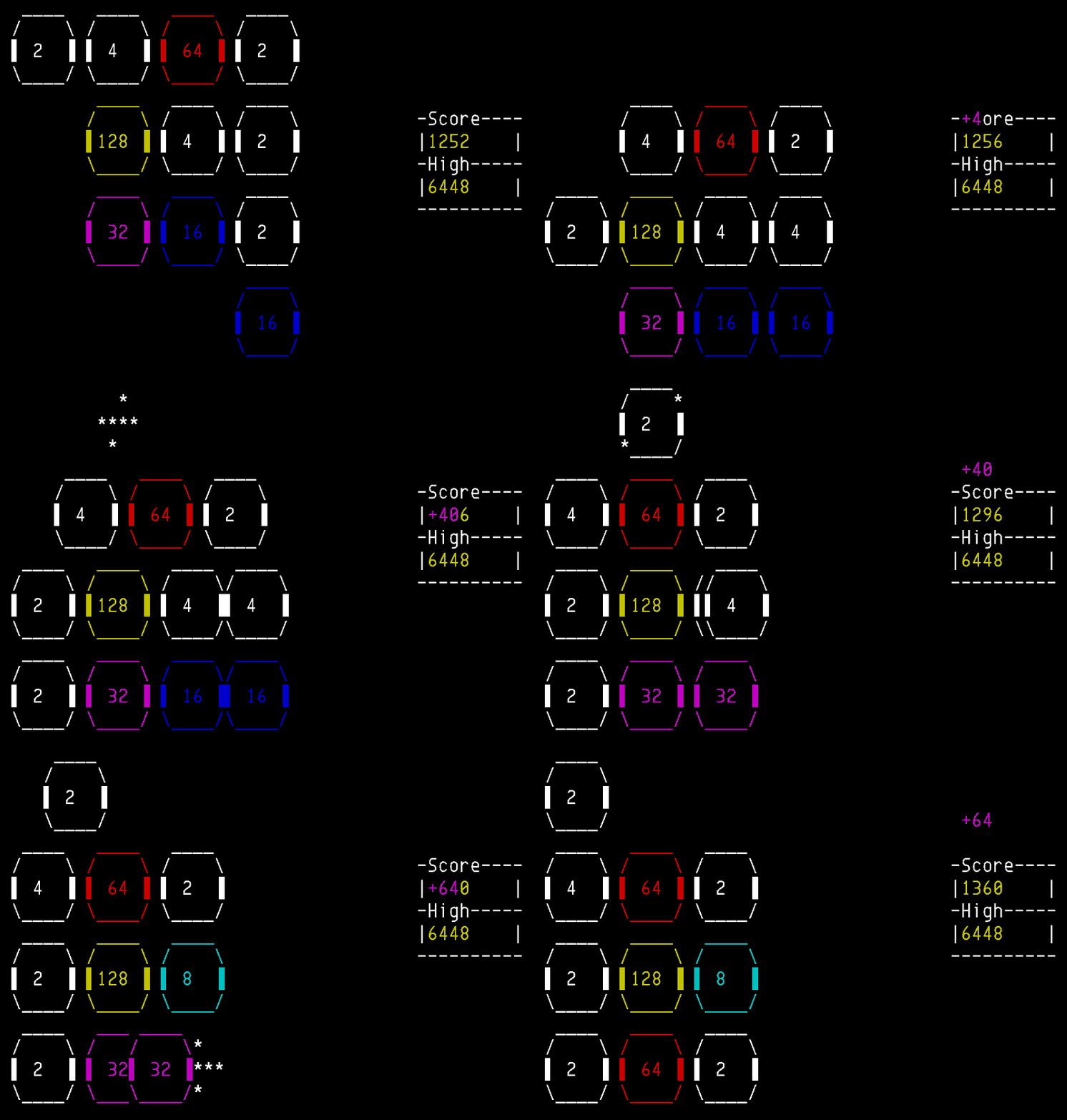
It’s sad that 2048tty got no attentions when it’s easily by far the best implementation I have ever played. Just one star and nothing else except 5 author self-opened issues.

https://blogger.googleusercontent.com/img/b/R29vZ2xl/AVvXsEhseJRGXjPNLA1vu08yWnrp9oFEonioYLnzf-UOFruMfbJxtvj1bP7We0VD-BrHpsFM4wPy_PdSDbOx-QoCbwf1mkHnbTdlzr5LVSuKtaxeSFnRiWDjKEM7Gb_xXAHfrP2C95bqR1VNOfA/s800-Ic42/2048tty.gif

With --animate0.1

You use hjkl to play.

As you can the animations above, not only the tiles get the sliding motion — which I’ve seen before in at2048 — but also the scoring, the just-earned points floating up. High score and progress is saved, so you can quit at anytime and continue playing later.

Even it’s graphics is designed, not just simply put a box around a number, but an oval-shaped tile. Not like there is anything wrong about rectangular box, but you can see who puts more thought on the graphics designs.

2048tty was created by Samuel Phillips on 2014-12-27, written in Python 3 with ncurses under the GPLv3, currently git-ed56d8e (2015-01-31, post v1.0 (2015-04-30)0.

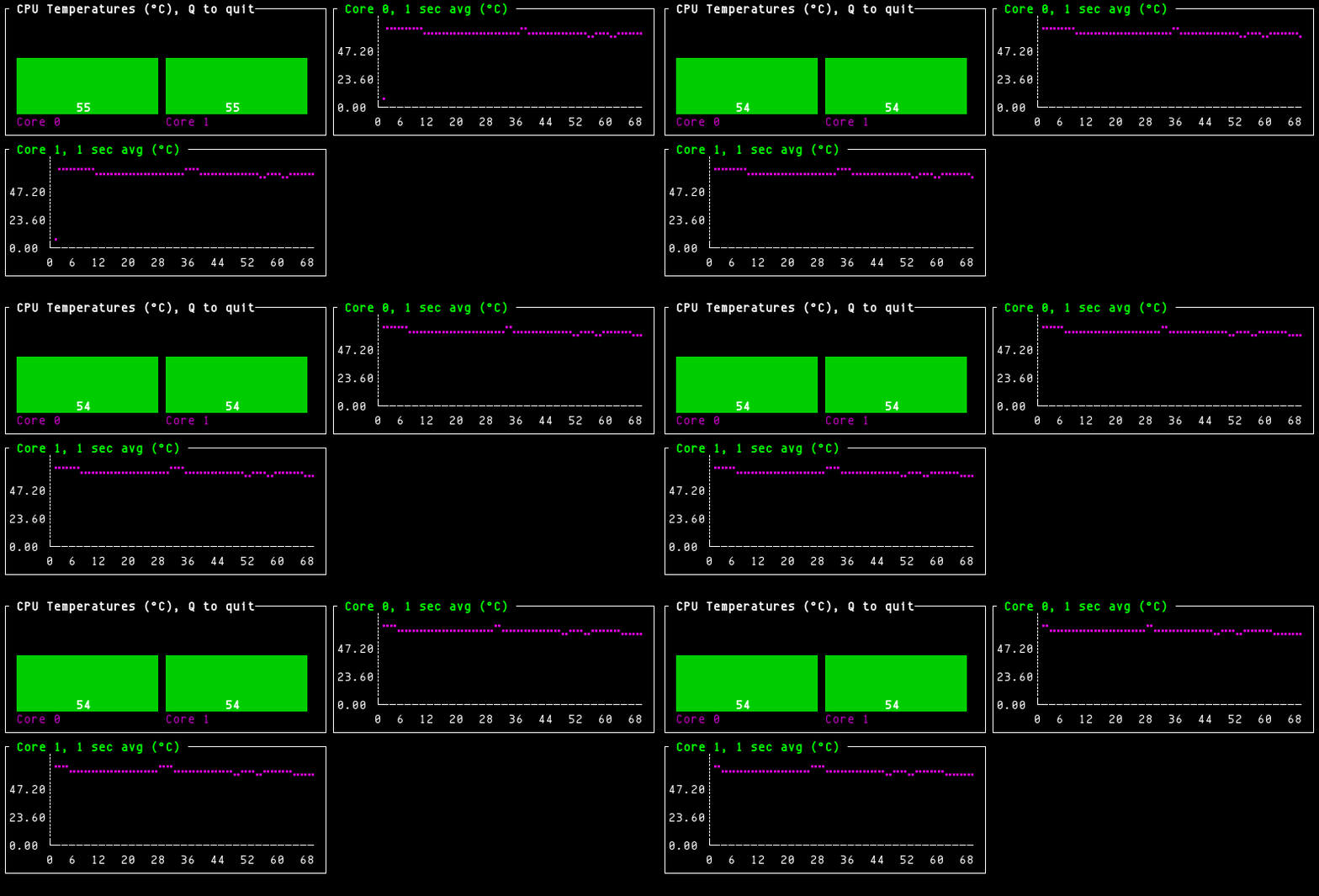
i7tt is a nice CPU temperature monitor. It draws each core in line chart in Braille and groups all cores in a bar chart for overview, which uses different colors to indicate the temperature ranges.

https://blogger.googleusercontent.com/img/b/R29vZ2xl/AVvXsEiWWO6BAmSE79UcoScLgWTb7fxP2uVpiqf4YuYxNta-TkNcmJcft9Ez5NK2ElJHJYbGbAVA33z2McEn8LdVIEpHkNEivwjnbQ2dh8lY61tqnu1xdxsezQ3VJXWFYVSLUZL211pEILo7V5c/s800-Ic42/i7tt.gif

There is only one command-line option for average period. It uses coretemp driver’s sysfs interface to get the data.

i7tt was created by Marios Andreopoulos on 2015-08-19, written in Go with termui under the GPLv3, currently git-3335dbb (2015-11-20, post v1.03 (2015-08-28)).

This morning I created an issue as title on a project called “hawaii-terminal,” that’s kind of trolling, haven’t got any responses yet. By that, I meant getting closed without any comments.

Sadly, it’s the end of my grow light, the tomato was dead, the stem dried out. I sowed six green beans in it as seedling bottle and placed it outdoor. For some reason, I couldn’t germinate green beans. Hopefully, they would come up.

As of the grafts, the tomato on basil seems fine, still alive that is; basil on mint is sorry-looking dead. Tomorrow, I will try again to graft onto a more thicker stem.

I saved some dill, one green and three roots, they are either purely green or root parts, not sure if the green will regrow root or roots shoot out greens. I have to say no.

Two compost container, one is mostly done, another might be half way. I will bag the finished part tomorrow. I noticed two cabbage ends grow new white stalks, I snipped them off, but I am thinking to regrow cabbage ends. I might also pot that poor orchid sitting in compost.

What else?

  • Reported another GitHub spam account.
  • Sowed five grape seeds.
  • One of two left basil flower heads after pruning has snapped, which was flowering white flowers, too bad.
  • Trying to write a script to download all my YouTube videos’ thumbnails, for big #1000. Currently, the number of videos is 857 (142 videos are not part of READYT), 73MB thumbnails, I am too early.
  • Thinking about drying a section of corncob. I had dried a sweetcorn cob before, but I was hoping they would pop, they didn’t, of course. I wonder if I can save cron seeds this way.

The tomato under grow light was flopping, I don’t think it’s dying, just it wasn’t rooted well and I gave it give some water a couple of days ago, didn’t realize that it plopped down. The stem is still rigid, all is good, I hope.

The Google Consumer Surveys responses were still showing zeros this morning, maybe the update interval is relatively long, but it should be in real-time.

Finally, I figured out how to properly install Perl modules, or so may I think.

Those unripened tomatoes really take their sweet time to turn, only a few are in orange, some in yellow, half of them still is in green. But I am confident that they will all turn red this summer.

Two small bags of mushroom needed bigger rooms, but one of them had developed green mold, it’d have to go to compost after it’s dry. The other one was fairly covering the cardboard in white stuff and has been upgraded, bigger bag and more shredded cardboard.

Last week, 2016-01-22, I installed the Google Consumer Surveys, still no responses today, so I finally took a look. I misread the instruction and placed a piece of code for embedding script at wrong place resulting function not found, but it didn’t matter, after I correct it, it’s a 404. I am not from those countries where you will see the surveys, so I didn’t try to confirm the installation since I legitimately can’t do so. I might remove all this hassle.

Since 404 wasn’t the fault on my part, I contacted GCS and got a reply that pointed out that I had survey and Website Satisfaction codes put together in the same page. I fixed it, but six hours later, still seeing no responses analyzed, so I sent a reply and got a screenshot showing it’s working. The report page must not be updated frequently.

The weather forecasts next 5 out of 7 days would be rainy days and 78%+ humidity. The fortunate two days are cloudy days. It would be wet and humid in the following days.